
Best of
The Best Way to Do HVAC Takeoffs in 2026 (Without Printing Drawings at A3)

Most HVAC takeoffs still start the same way. The tender pack lands, you work out which revision is current, print the mechanical layouts at A3, and sit down with a scale rule and a set of highlighters. Every diffuser, grille, fan coil unit and damper gets a tick. Every duct run gets measured. Then it all gets typed into the BOQ spreadsheet, line by line, often at the kitchen table after a full day on site.
It works, but it’s slow, and the checking is the hard part. A week later, nobody can say where “42” came from without counting again.
What does the best HVAC takeoff process look like?
The best process isn’t about counting faster. It’s about counting once and being able to prove every number afterwards. That means:
- The pack is sorted first. Every drawing and revision is registered before any counting starts, so you’re never pricing off an old sheet.
- Every line has a trail. The drawing, page and revision sit beside each quantity, so a check is a look, not a recount.
- Gaps are flagged, not guessed. If a symbol or a note isn’t clear, it becomes an open question.
- Your estimator signs off before pricing. Quantities are checked and locked before a single rate is applied.
- Pricing uses your rates. Not a price that looks about right.
- Addenda don’t mean starting again. You see what changed and what it does to the price.
A contractor told us their BOQ spreadsheet works fine. The hard part is reading layered drawings and working out where the scope stops. That’s where your estimator’s attention belongs, and it’s exactly what gets squeezed when the counting and typing take all day.
Why is printing drawings at A3 so slow?
Because the takeoff becomes a copy of a copy. You count on paper, write it in the margin, type it into the spreadsheet, then copy it into pricing. Each step is another chance to drop a line, and none of it leaves a trail back to the drawing. When the builder asks a question, or the drawings change, you’re back at the plans.
| Step | Printed drawings and highlighters | The best setup |
|---|---|---|
| Sort the pack | Work out which revision is current by eye | Every document and revision registered before counting starts |
| Scope notes | Hope you spot every “contractor to” note | Every “contractor to” note pulled into one list |
| The count | Tick symbols on paper, write totals in the margin | BOQ built in your layout, with a drawing cut-out, the legend line, drawing number and revision beside each line |
| Unclear items | Guess to keep moving, or stop and lose the thread | Flagged as an open question, never guessed |
| Checking | Recount to be sure | Number against picture, line by line |
| Pricing | Look up rates and retype the quantities | Your rates, each with its source and date; any missing rate listed for you |
| Addendum | Reprint, recount, retype | Change schedule with before-and-after excerpts and the price difference |
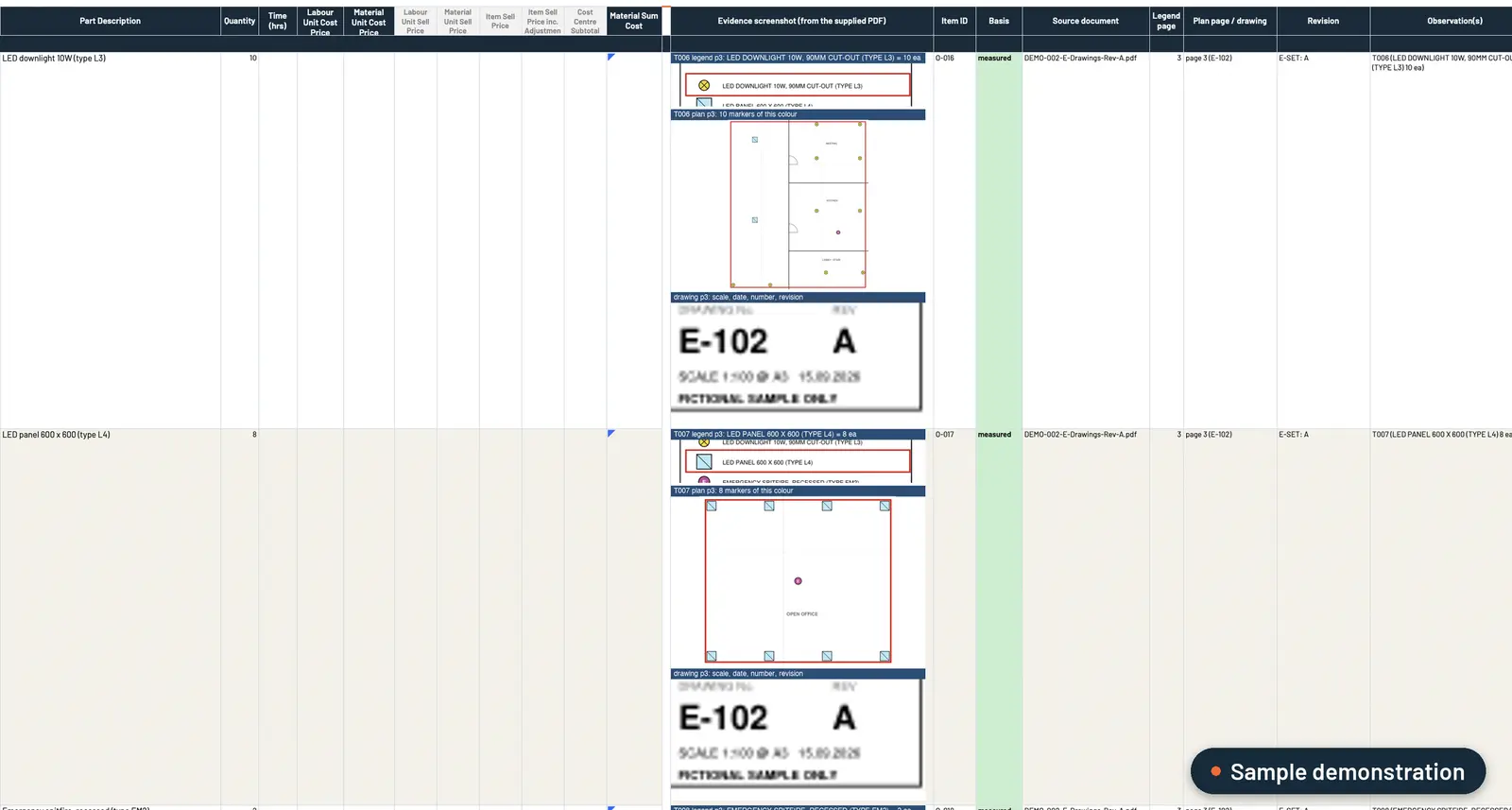 Sample data. Each BOQ line carries its evidence: the legend line, the plan markers counted, and the drawing number and revision.
Can AI do an HVAC takeoff you can actually trust?
Not from one prompt. Drop the drawings into ChatGPT or Claude and you’ll get a spreadsheet in seconds. Then you look closer. Where did that number come from? Did it pick up the dampers on level two? Are those rates yours? To trust it, you redo it, and you’ve added a step instead of saving one. We covered why in the best AI estimating setup for subcontractors.
Estimating isn’t one task. It’s a process. So we build the whole process: a custom estimating plugin for your own Claude or ChatGPT business account that runs the 15 stages a good estimator works through, from tender pack to quote, set up around your trade, BOQ layout, pricing and quote template. It works in four stages:
- Measure. It registers every document and revision, pulls out every “contractor to” note and builds the BOQ in your layout. Each line shows where it came from and is tagged measured, calculated, allowance (with its rule) or flagged. Unclear items are flagged, never guessed.
- Approve. Your estimator checks instead of redoing: number, picture, number, picture. Changes save as a new revision, marked as theirs, and sign-off locks to that exact BOQ.
- Price. Your rates, each with its source and date. Any missing rate is listed for you to fill in. You get an internal pricing workbook and a draft quote on your letterhead, with your costs and markups kept off it.
- Addenda. Addendum in, change schedule out, with before-and-after excerpts and the price difference. Your original stays untouched.
It works with your files where they already live: on your computer, or synced from SharePoint, OneDrive, Google Drive or Dropbox. Workbooks open in Excel or Sheets.
How do you know the takeoff is right before you rely on it?
We prove it on your own completed jobs first. You give us three jobs you’ve already priced. We run the first one with you and compare it line by line, then lock the setup and run the other two without seeing your numbers. The target is every row and the price matching to the cent. Where it differs, we show you why and fix the rules, never the answer.
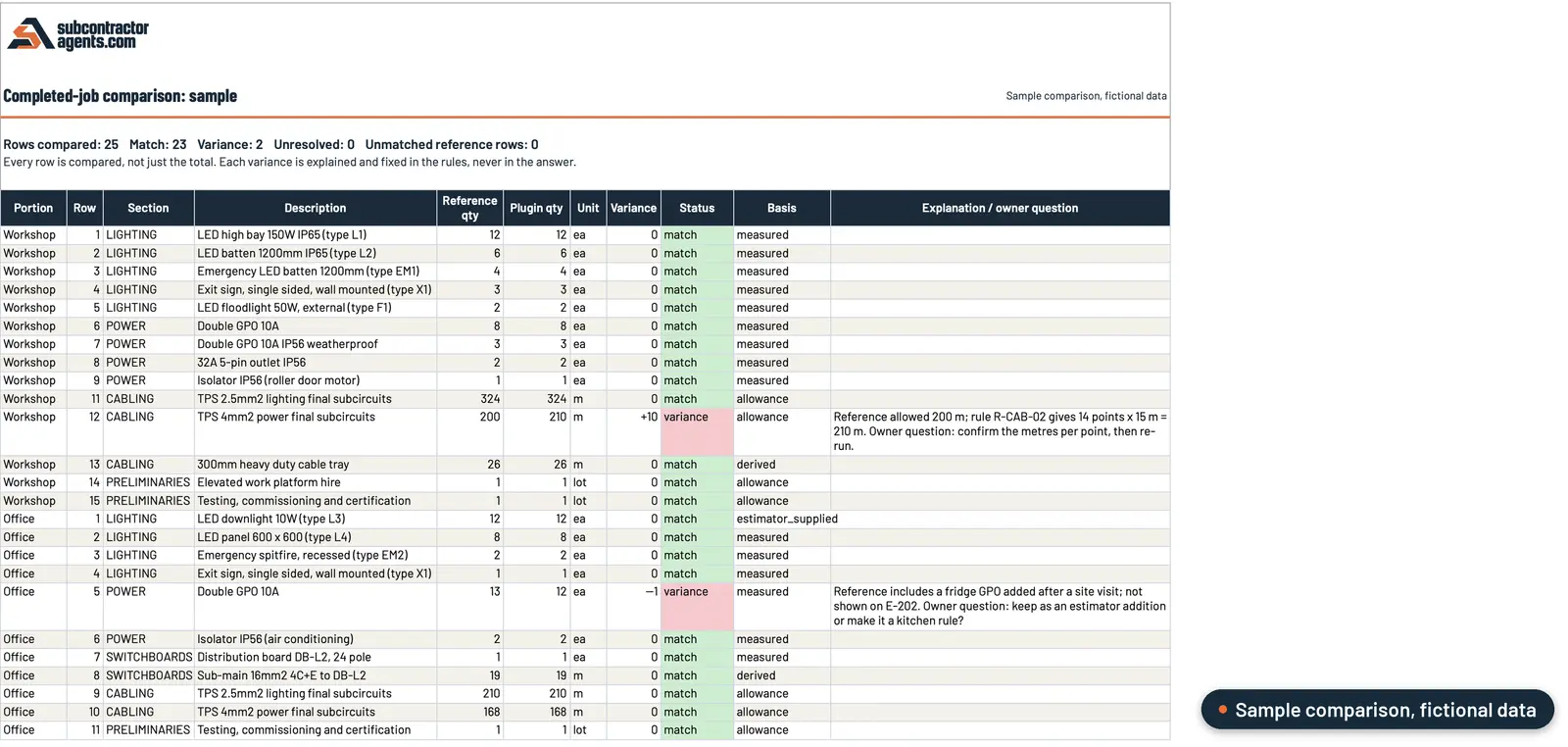 Sample data. A completed-job comparison checks every row, not just the total, and each variance gets an explanation.
You keep quoting the way you do now while we build it, and switch over once you’ve seen it match your own jobs.
Where does your estimator still come in?
At every point that needs judgement:
- They sign off the BOQ before anything is priced.
- You fill in any missing rate and approve the price.
- You approve the quote. Nothing goes to the builder until you have.
It doesn’t replace your estimator. It takes the redoing and the typing off them, so their time goes on checking the numbers and making the calls. If the retyping between the takeoff, pricing and the quote is where your time goes, our checklist for quoting faster without cutting corners walks through it step by step.
What have HVAC contractors seen?
One HVAC director in Victoria told us: “First draft came back in about 20 minutes and I had pricing approved inside two hours. That used to be four days.” That workflow was set up with this customer’s own process steps. Your numbers will depend on your jobs, so we’ll measure it on three of yours, start to finish, checking and corrections included.
Is it worth a look?
If you’re a commercial HVAC subcontractor quoting from drawings, and the takeoff is eating your evenings, yes. We build it from three of your quoted jobs, your pricing sheet and your quote template, and it’s live in 14 days or you get your money back. It’s A$6,000, one fixed fee.
See how our estimating plugin works, and bring a recent tender to the call.
Frequently asked questions
What is the best way to do an HVAC takeoff?
Do it once, and make every line checkable. Register the drawings and revisions first, build the BOQ in your own layout with the drawing, page and revision beside every line, flag anything unclear instead of guessing, and have your estimator sign it off before anything is priced.
Can AI do an HVAC takeoff from PDF drawings?
It can build a draft you can check, if it's set up as a process rather than one prompt. The plugin we build shows a drawing cut-out, the legend line, drawing number and revision beside each BOQ line, tags each line measured, calculated, allowance or flagged, and flags what it can't read.
Do I still need to check the takeoff?
Yes. Your estimator checks number against picture, line by line, and signs off the BOQ before anything is priced. Changes save as a new revision, marked as theirs, and nothing goes to the builder until you've approved it.
What happens when an addendum changes the mechanical drawings?
You get a change schedule with before-and-after excerpts and the price difference. Your original BOQ stays untouched, so you're not starting the takeoff again.
What does it cost?
A$6,000, one fixed fee. It's live in 14 days, backed by our 14-day money-back guarantee. Your Claude or ChatGPT business plan is paid separately, directly to them.
Want this set up on your own jobs?
We build your estimating plugin in your own Claude or ChatGPT account, around your rates and template, and prove it on three of your completed jobs. A$6,000 fixed.
Book a workflow call →Has worked with 80+ subcontractors on estimating, tendering and job reporting.