
Dashboards
Xero, Procore and a Crew App: How to Stop Double Handling With One Dashboard

Most subcontractors we talk to aren’t short on software. Invoices and bills sit in Xero. The builder’s drawings, RFIs and variations come through Procore. The crew clocks on in an app. Quotes live in a folder of spreadsheets, and supplier prices sit in someone’s inbox.
Each system does its job. The trouble starts when you want an answer that crosses them. Which quotes are still open? Who hasn’t sent their price back? Is that job tracking to the hours we quoted? Nobody can see it in one place, so someone builds a spreadsheet every Friday, copying numbers out of each system by hand. That’s double handling, and it’s usually the owner doing it after hours.
What does double handling look like in a subcontracting business?
It’s the same number typed twice, or three times, because the question you’re asking lives across more than one system. Here’s where it usually shows up.
| The weekly question | Where the numbers live today | What gets retyped | What one dashboard shows instead |
|---|---|---|---|
| Which quotes are still open, and what are they worth? | Quote spreadsheets and sent emails | Quote names, values and dates into a tracking sheet | Every open quote, its value and its stage |
| Which quotes need chasing? | Sent folder and memory | Follow-up dates into a calendar or a sticky note | Sent quotes whose follow-up date has passed |
| Which supplier prices are still missing? | The estimator’s inbox | Who was asked and who replied, into a list | Requests with no reply, and which are past due |
| Which jobs haven’t had an update? | Site notes, texts and emails | This week’s notes into a weekly report | Active jobs with no update in the last week |
| Is the job tracking to the hours we quoted? | The pricing sheet and the crew app | Quoted hours and worked hours, side by side | Quoted against worked hours, job by job |
| Have we been paid? | Xero | Invoice status into the job list | Outstanding invoices beside the job they belong to |
None of those rows needs a new system. Every number on the right already exists somewhere. The work is gathering it, and that’s the part that gets done by hand.
Why don’t the apps you already pay for fix it?
Because each app is built around one job. Your accounting software is built around invoices and bills. The builder’s project platform is built around their project, not your business. The crew app is built around clock-ons. They’re good at what they do, but none of them is built to answer “what needs my attention this week?” across all of them.
So the answer gets rebuilt by hand. One contractor described drawings, job codes, the people asked for prices and the prices that came back all needing to stay connected for each tender, and none of it living in one place. Another told us that when their invoice automation failed, someone still had to reconcile the records by hand. A link between two apps doesn’t help much if you can’t see when it’s stopped working.
What should one dashboard actually show?
Start from the checks you already make every week, not from a list of everything the software can measure. For most commercial subcontractors that’s:
- Quotes awaiting review. Drafted, but not yet checked before they go out.
- Open quote value. What the quotes still in play are worth.
- Supplier replies outstanding. Prices asked for and not yet back, with the ones past due flagged.
- Late follow-ups. Sent quotes whose follow-up date has passed.
- Jobs needing an update. Active jobs with no site update in more than a week.
- Quoted against worked hours. The labour you priced beside the hours your crew has logged.
Six numbers you trust beat thirty you don’t. If a number can’t be traced back to where it came from, people go back to the spreadsheet to check it, and you’re double handling again.
What makes a dashboard worth opening every morning?
A dashboard only stops double handling if people trust it more than the spreadsheet it replaces. That comes down to a few rules:
- Each number is entered once. It goes in the system it belongs to, and the dashboard reads it from there.
- Every number shows its source and its age. If a figure hasn’t refreshed, it’s marked as stale, not quietly shown as current.
- It shows what needs action, not just totals. A late follow-up or a missing supplier price is something to do today. A total is something to look at.
- Nobody gets another app. An operator told us they’d rather have a weekly email about where the team worked than ask everyone to learn something new. The less you ask of the crew, the better the numbers are.
Where does the estimate fit in?
Quoted against worked hours is the check most subcontractors want and few can see. The labour you priced is in the pricing sheet. The hours worked are in the crew app. Comparing them means opening both and copying one into the other.
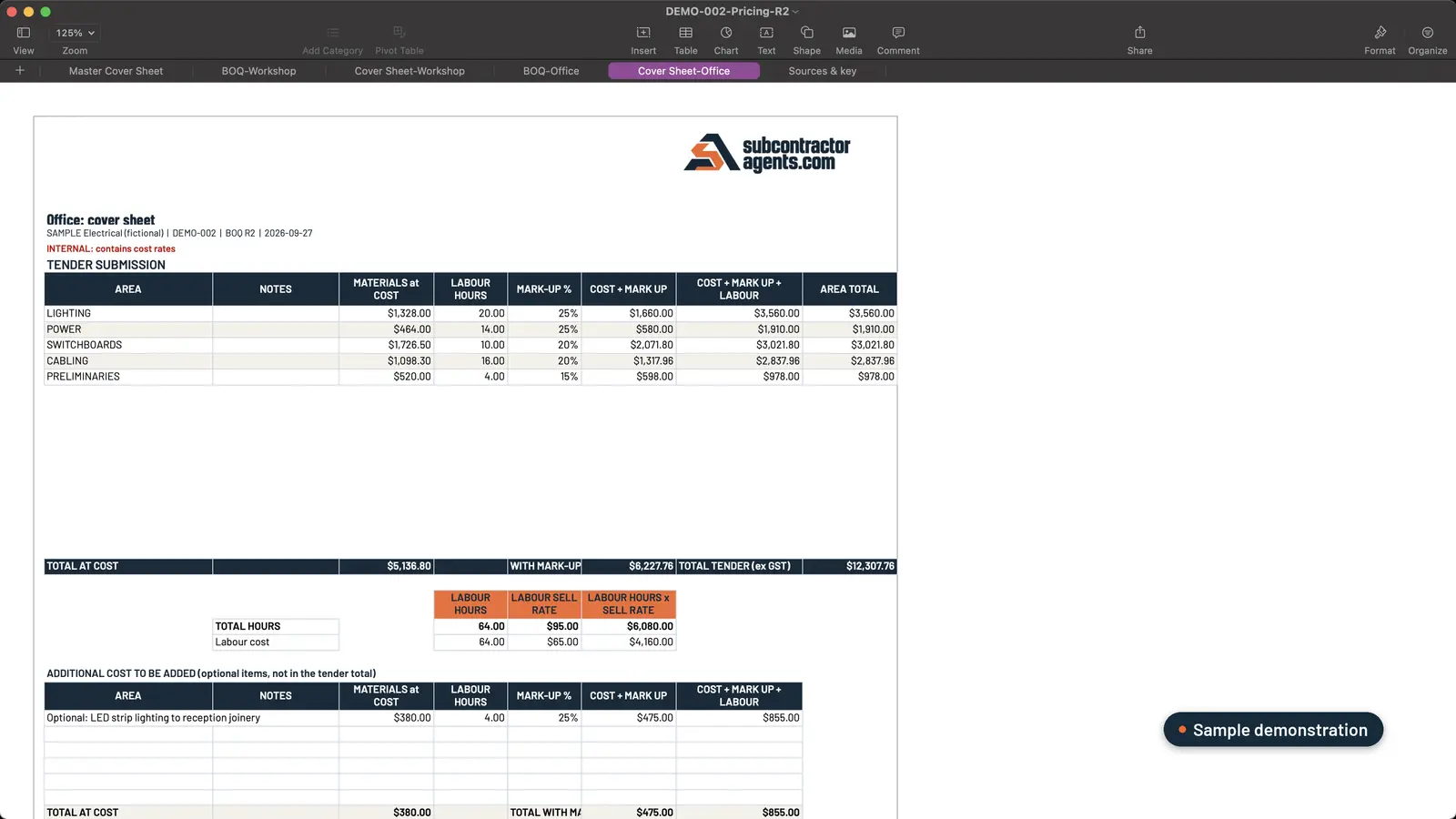 Sample data. The internal pricing workbook holds the labour hours you priced, area by area.
That number only exists if the estimate is built properly in the first place. Our estimating plugin builds an internal pricing workbook with your markups and labour hours, plus a draft quote on your letterhead with your costs and markups kept off it. It works on your files where they already live, on your computer or synced from SharePoint, OneDrive, Google Drive or Dropbox, and the workbooks open in Excel or Sheets. If the retyping starts before the quote even goes out, we walked through it in simPRO, AroFlo, Procore… and you’re still typing quotes out by hand, and in our checklist for quoting faster without cutting corners.
How do we build a dashboard for you?
Custom Dashboards is a separate service from the estimating plugin. The estimating plugin works on your files. Connecting the systems you already run, such as simPRO, AroFlo or Microsoft 365, is dashboard work.
We build it around the checks you already make every week: quotes awaiting review, missing supplier replies, jobs that need an update. Which systems it can read from depends on what you run, and we’ll go through yours on the call.
If someone in your business rebuilds the same spreadsheet every Friday, book a call. Bring the list of questions you ask every week and where the answers live today.
Frequently asked questions
What should a subcontractor's business dashboard show?
The checks you already make every week: quotes waiting for review, open quote value, supplier prices still outstanding, sent quotes overdue for a follow-up, jobs without a recent update, and quoted hours against hours worked. Each number should show where it came from and when it was last updated.
Do I need to replace Xero, Procore or our crew app?
No. Each of them does its own job. A dashboard sits on top of the systems you already run, so the numbers stay entered once, in the system they belong to, and you check them in one place.
Will my crew have to learn another app?
They shouldn't. An operator told us they'd rather get a weekly email about where the team worked than ask everyone to use another app. The best dashboard works from what people already send and enter.
Is the dashboard part of the estimating plugin?
No. Custom Dashboards is a separate service. The estimating plugin works on your files where they already live, and connecting the systems you run, such as simPRO, AroFlo or Microsoft 365, is Custom Dashboards work.
Want to see what needs your attention first?
We build custom dashboards around the checks you make every week: quotes awaiting review, missing supplier replies, jobs that need an update.
Book a call →Sets up and hands over every estimating plugin with Mac, from the first tender pack to the quote letter.