
Dashboards
The Quote Tracking Dashboard: Every Open Quote, Follow-Up and Win Rate in One View

Ask most subcontractors how many quotes they have out right now and you’ll get a pause, then a guess. The quotes are in a folder. The values are in a spreadsheet, if someone kept it up. The follow-ups are in the owner’s head, or on a sticky note that went through the wash. And the win rate? Nobody’s worked it out since the accountant asked last June.
That matters because every tender takes days of your most expensive person’s time, whether you win it or not. If you can’t see which quotes are still live, which need a phone call today and which kind of work you actually win, you can’t decide which tenders are worth that time.
What is a quote tracking dashboard?
It’s one screen that answers the questions you already ask about your quotes every week, without anyone rebuilding a spreadsheet to answer them:
- What have we got out, and what’s it worth?
- Which quotes need chasing today?
- Which drafts are waiting to be checked before they go out?
- Of the quotes that have been decided, how many did we win?
It doesn’t replace the place you keep your quotes. It reads from it. Each quote is entered once, in the quotes register, and the dashboard works out the rest.
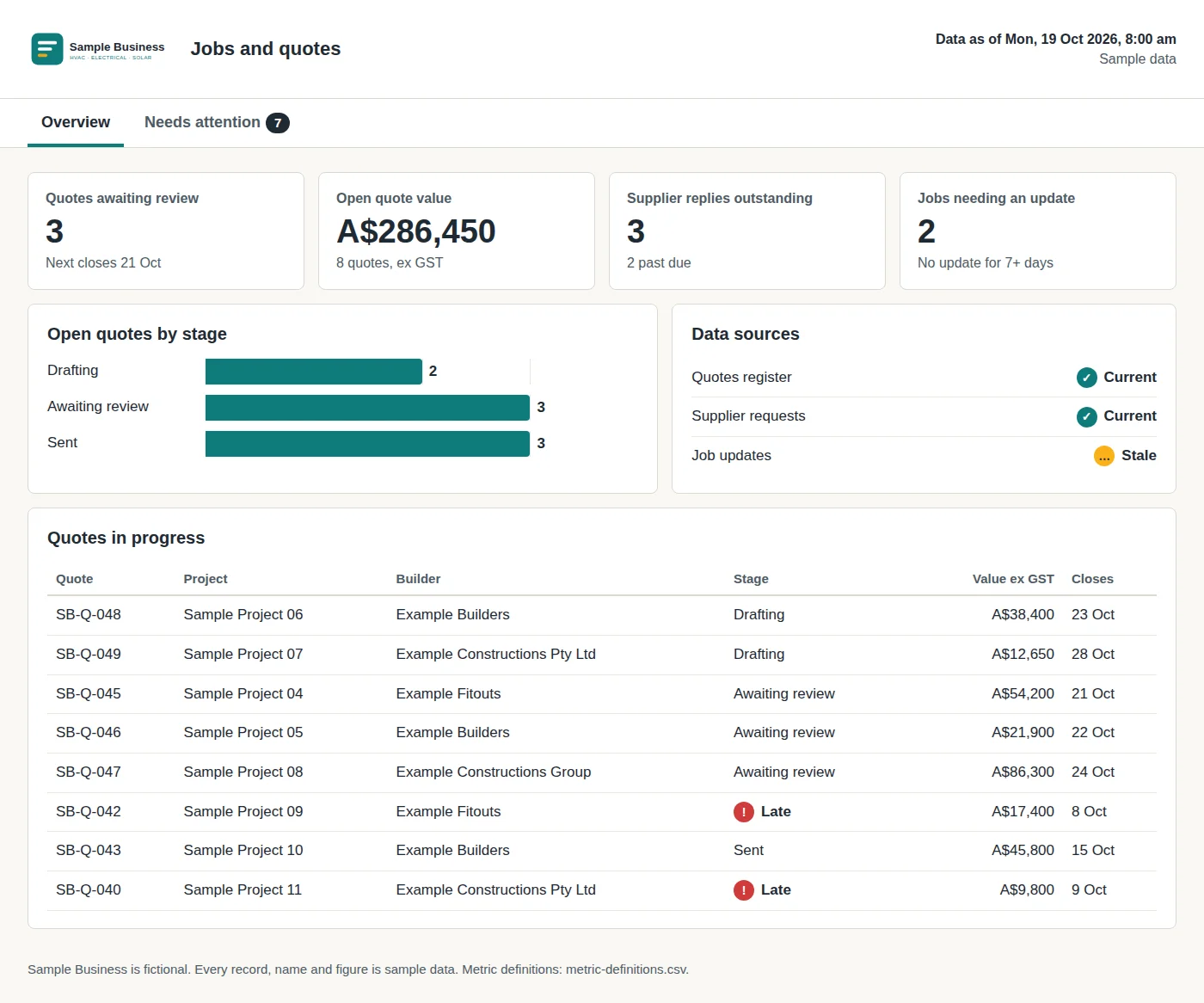 Sample data. A fictional subcontractor’s jobs and quotes dashboard: open quotes by stage, the value still in play, and two sent quotes flagged late for follow-up.
What should it show, and where does each number come from?
Start from the checks you make, not from everything a dashboard could measure. These are the ones that matter for quoting, and every one of them comes from the same few columns in a quotes register: quote number, project, builder, stage, value, closing date and follow-up date.
| What you see | What it answers | How it’s worked out | What you do with it |
|---|---|---|---|
| Quotes awaiting review | What’s drafted but not yet checked? | Quotes at the stage “Awaiting review” | Check them before the tender closes |
| Open quote value | What’s still in play? | Total value ex GST of quotes at Drafting, Awaiting review or Sent | Decide whether you can take on the next tender |
| Late follow-ups | Which sent quotes have gone quiet? | Stage is Sent and the follow-up date is before today | Call the builder |
| Next closing date | What’s due first? | Earliest closing date among quotes not yet sent | Plan the week’s estimating |
| Win rate by count | How often do we win? | Quotes won ÷ quotes decided, over a set period | Spot a change in how often you win |
| Win rate by value | Do we win the work that matters? | Value won ÷ value decided, over the same period | See if you’re winning small jobs and losing big ones |
| Stale source | Can I trust these numbers? | The register hasn’t refreshed in the last 24 hours | Check the export ran before you act on it |
Seven numbers you trust beat thirty you don’t. If a figure can’t be traced back to the register, people go back to the spreadsheet to check it, and you’re doing the work twice.
How do you track quote follow-ups without forgetting one?
Give every quote a follow-up date the day it goes out. That’s the whole system. The dashboard then flags any sent quote whose date has passed, and the list of calls to make today builds itself.
The usual failure isn’t a bad follow-up rule. It’s quotes with no follow-up date at all. They go out on a Thursday night, the builder goes quiet, and three weeks later you find out the job was let to someone else. A follow-up date on every quote turns “I meant to ring them” into a line on a list.
Keep the follow-up honest, too. If you’ve called and the builder says they’ll decide next week, move the date. Don’t mark the quote won or lost until it is.
How do you work out your quote win rate?
Win rate is the quotes you won divided by the quotes that have been decided, over the same period. Three rules keep it useful:
- Only count decided quotes. A quote still waiting on the builder isn’t a loss yet. Count it once it’s won, lost, or past the point you’ve agreed it’s dead.
- Decide when silence counts as a loss. Builders often don’t tell you when you’ve missed out. Pick a rule, such as 60 days after the tender closes with no answer, and stick to it, or your win rate will look better than it is.
- Work it out by count and by value. Winning eight small service jobs and losing two big fit-outs looks healthy by count and poor by value. You need both to see it.
Then split it the ways you’d actually use: by builder, by type of job and by size. That’s where it starts to pay off. If you rarely win work from one builder, or above a certain size, you can see which tenders deserve your evenings and which deserve a polite “not this time”.
Why does a spreadsheet stop working for quote tracking?
It doesn’t, at first. A quotes register in Excel is the right place to keep quotes. The problem is everything people try to do on top of it: colour-coding late follow-ups by hand, a second tab for the win rate that’s out of date the day after it’s built, a total that’s quietly missing the rows someone added at the bottom.
A dashboard keeps the register as it is and takes the hand-built layer off it. The stage and the dates you already enter are enough to work out what’s late, what’s open and what you’ve won. We went through the wider version of this, Xero, Procore and a crew app included, in how to stop double handling with one dashboard.
Where does the quote itself come from?
A quote tracking dashboard tells you what happens after a quote goes out. It can’t help much if quoting takes so long you only get a few out the door. Supplier prices are usually the hold-up, which is why we wrote about sending supplier RFQs the same day the tender lands, and the dashboard’s “awaiting review” count is only short if the drafts are quick to check.
That’s the job our estimating plugin does. It builds your BOQ with the drawing, page and revision behind every line, prices it from your own rates and drafts the quote, and nothing goes out until you approve it. Custom Dashboards is a separate service that tracks what happens to the quote after you send it.
How do we build a quote tracking dashboard for you?
We build custom dashboards around the checks you make every week: quotes awaiting review, missing supplier replies, jobs that need an update. Which of your systems it can read from depends on what you run, and we’ll go through yours on the call.
If nobody in your business can say how many quotes are out or which ones need a call today, book a call. Bring your quotes register, whatever shape it’s in.
Frequently asked questions
What should a quote tracking dashboard show?
Every open quote with its stage, value and closing date; the sent quotes whose follow-up date has passed; quotes drafted and waiting for review; and your win rate over a set period. Each number should show where it came from and when it was last refreshed.
How do you work out a subcontractor's quote win rate?
Divide the quotes you won by the quotes that have been decided, won or lost, over the same period. Work it out by count and by value, because winning lots of small jobs and losing the big ones looks fine by count and poor by value. Decide up front when a quote with no answer counts as lost.
When should I follow up a quote I've sent to a builder?
Set a follow-up date on every quote the day it goes out, usually a few days before or after the tender closes, and let the dashboard flag it when that date passes. The rule matters less than having a date on every quote, so nothing goes quiet by accident.
Do I need new software to track quotes?
No. Most subcontractors already keep a quotes register in a spreadsheet. A dashboard reads from it, so each quote is entered once and the open value, late follow-ups and win rate are worked out for you.
Is the dashboard part of the estimating plugin?
No. Custom Dashboards is a separate service. The estimating plugin prepares the quote; the dashboard tracks what happens to it after it's sent.
Want to see what needs your attention first?
We build custom dashboards around the checks you make every week: quotes awaiting review, missing supplier replies, jobs that need an update.
Book a call →Has worked with 80+ subcontractors on estimating, tendering and job reporting.