
Quoting
Waiting on Supplier Prices: How to Send RFQs the Same Day the Tender Lands

The tender lands on a Monday. It closes Friday week. You know the drawings need to go out to your suppliers, but first someone has to work out what to ask them for. So the pack sits while the takeoff gets done, and by the time the requests go out it’s Thursday. Now the suppliers have a few days, the price comes back the afternoon the tender closes, and the quote goes out on a guess or not at all.
The suppliers aren’t the slow part. The request is.
Why are you always waiting on supplier prices?
Because the RFQ is stuck behind the takeoff. On most commercial jobs the process runs in a line: sort the pack, count and measure, type up the BOQ, then ask suppliers for prices. Every day the takeoff takes is a day the supplier doesn’t get.
We hear the same story on calls. On a big job the drawings are dense enough that the estimator prints them at A3 just to read them, then scales everything off by hand. That takes days. The drawings go out to suppliers, and then everyone waits for prices.
There’s a second cost. When the RFQ is rushed, it’s vague. “Please price the attached drawings” gets you a number for whatever the supplier thought you meant, and you only find out what they left out when you’re comparing prices at the last minute.
What should a supplier RFQ include?
A good RFQ means the supplier can price it without ringing you, and you can compare the replies line by line. Here’s what to put in every one.
| Include | Why it matters | Where it comes from |
|---|---|---|
| Item, part number or description | The supplier prices what you’ll actually install | Your BOQ |
| Quantity and unit | Prices come back for the right amount | Your checked takeoff |
| Drawing number and revision | Nobody prices off a superseded sheet | The tender document register |
| Project name and builder | The supplier can match it to other enquiries on the same job | The tender invitation |
| Date you need prices by | Leaves you time to review before the tender closes | Tender close date, less your review time |
| What the price should include | Delivery, GST and validity are stated, not assumed | Your standard request |
| A request to list exclusions | A cheap supplier price can hide expensive exclusions | Your standard request |
The last row is the one most often skipped. Before you pick the cheapest price, check what’s been left out. Three supplier totals that cover three different scopes aren’t comparable.
How do you get RFQs out the same day the tender lands?
You can’t skip the takeoff, but you can stop it holding everything else up. Here’s the order that works:
- Register the pack first. List every drawing and its revision before anything else, so every RFQ points at the current sheets.
- Send the schedule items straight away. Equipment that’s fully scheduled on the drawings can usually be priced from the schedule. Those requests don’t need to wait for your count.
- Get the quantities checked, not just counted. For anything priced on quantity, the RFQ is only as good as the takeoff behind it. Check each line against the drawing it came from before it goes to a supplier.
- Build the RFQ from the BOQ, not from the drawings. Once the BOQ is confirmed, the part numbers, quantities and drawing references are already there. Turning them into a request is copying, not estimating.
- Use one standard request. The same inclusions, the same “list your exclusions” line and a reply-by date, every time. You stop rewriting it for every tender.
- Set the reply-by date from the close date. Work backwards from when the tender closes and leave yourself time to review the prices before you approve the quote.
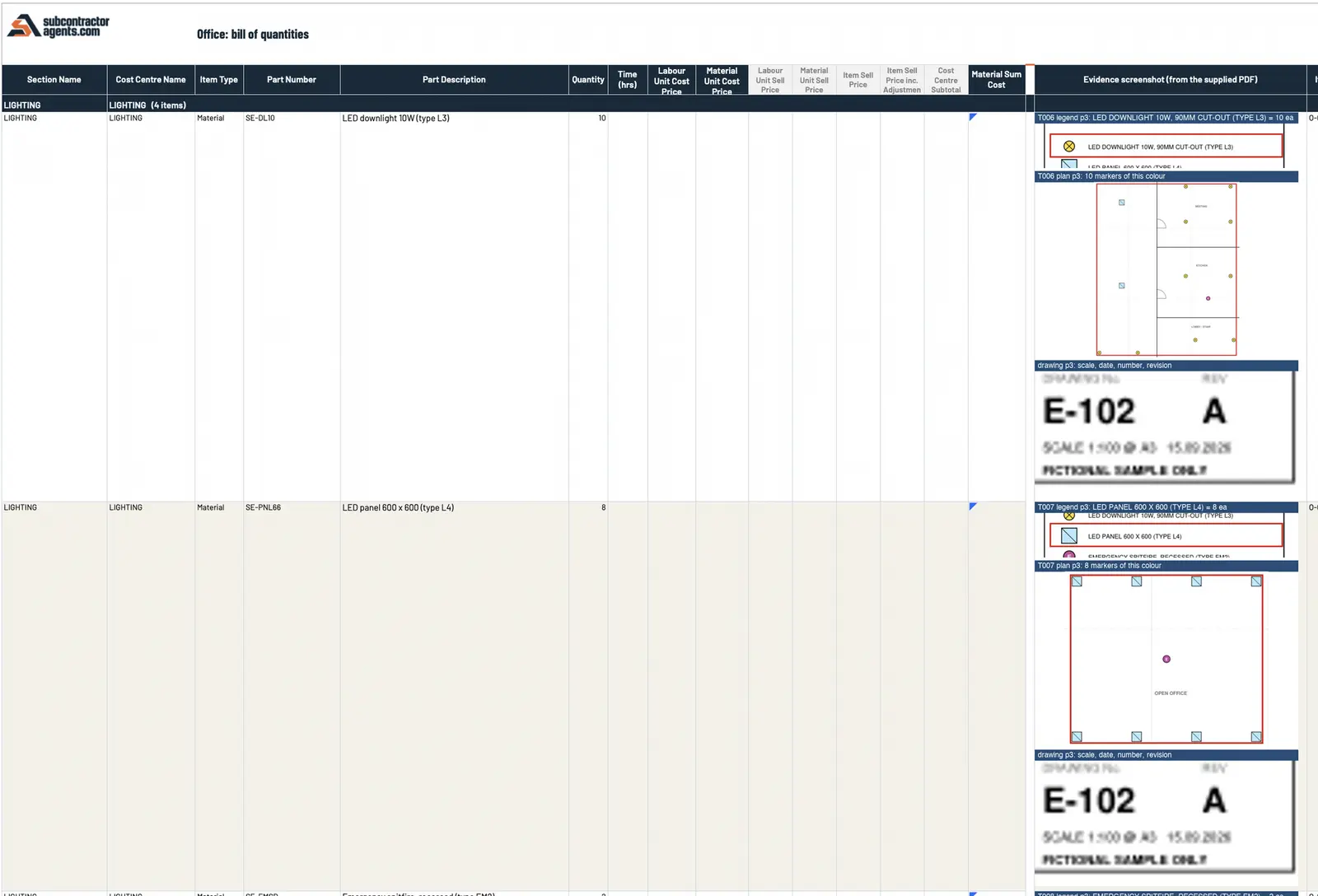 Sample data. An unpriced BOQ already holds what an RFQ needs: part number, description, quantity, and the drawing and revision each line came from.
Why does checking the quantities first save time?
Because a wrong quantity in an RFQ costs you twice. The supplier prices it, you put that price into your workbook, and when the error turns up you’re re-asking the supplier and repricing the job, usually the day before it closes.
If every line of the takeoff shows where it came from, checking it is a look, not a recount. We go through how to do that in how to check every line of an AI takeoff. The faster the quantities are confirmed, the sooner the RFQs go out.
Why can’t you just look up prices online?
Because those aren’t your prices. A contractor told us the prices you find online are nothing like the trade prices their business actually pays. Your margin depends on what your suppliers actually charge you, which is why the RFQ is worth sending properly in the first place. A plausible number from a website is not the same as a price your supplier will stand behind.
How do we take the RFQ off your plate?
We set up a custom estimating plugin in your own Claude or ChatGPT business account. It runs the 15 steps a careful estimator works through, in four stages, and supplier RFQs sit in the pricing stage:
| Stage | What the plugin does | Where you come in |
|---|---|---|
| Drawings to quantities (steps 1–7) | Registers every file in the pack with its revision, agrees the scope, counts, measures and builds the BOQ in your layout. Each line shows its drawing cut-out, legend line, drawing number and revision | Nothing, unless the scope is unusual |
| Confirm the BOQ (step 8) | Anything it couldn’t settle is flagged, never guessed | You check and confirm the BOQ |
| Pricing (steps 9–13) | Drafts RFQs for your suppliers, then loads your rates and labour hours, each rate with its source and date. A missing or expired rate is flagged, never filled in | You press send on the RFQs, then approve the price |
| Quotes and changes (steps 14–15) | A quote letter on your letterhead. When an addendum lands, only what changed is re-measured and re-priced | You approve each letter |
The RFQs are drafted from the BOQ you’ve just confirmed, so the quantities in them are the ones you’ve checked. Nothing goes to a supplier until you press send, and nothing goes to the builder until you’ve approved it.
For the rest of the quoting process, see our checklist for quoting faster without cutting corners.
Is it worth a look?
If you’re a commercial subcontractor quoting from drawings, in HVAC, electrical or solar, and supplier prices are always the last thing back, yes. We build it from three of your quoted jobs, your pricing sheet and your quote template, and prove it on those jobs before you rely on it. It’s A$6,000, one fixed fee, backed by our 14-day money-back guarantee.
See how our estimating plugin works, or book a call and bring a recent tender.
Frequently asked questions
What should a supplier RFQ include for a construction tender?
The items and quantities you need priced, with part numbers or a clear description, the drawing numbers and revisions they come from, the project name, the date you need prices back, and what the price should include, such as delivery and GST. Ask the supplier to list anything they've excluded.
Why do supplier prices come back so late?
Usually because the request went out late. If the RFQ waits until the takeoff is finished by hand, the supplier gets days less to reply before the tender closes. Getting the quantities checked sooner is what moves the whole timeline.
Can I send RFQs before the takeoff is finished?
For some items, yes. Suppliers can often price scheduled equipment straight from the drawings and schedules. But for anything priced on quantity, an RFQ built from unchecked numbers gets you a price for the wrong job, so check the quantities first.
Does the estimating plugin send RFQs to suppliers for me?
No. It drafts the RFQs for your suppliers and you press send. Nothing goes to the builder until you've approved it either.
What if a supplier price doesn't come back in time?
In the plugin we build, a missing or expired rate is flagged, never filled in, so you can see exactly which prices are still open before you approve the quote.
Want this set up on your own jobs?
We build your estimating plugin in your own Claude or ChatGPT account, around your rates and template, and prove it on three of your completed jobs. A$6,000 fixed.
Book a workflow call →Sets up and hands over every estimating plugin with Mac, from the first tender pack to the quote letter.