
Best of
The Best Electrical Estimating Workflow for Commercial Contractors (2026)

A commercial electrical tender usually lands as a pile: lighting and power layouts, a legend sheet, switchboard schedules, specs and an addendum or two. Before you count a single downlight, you’re working out which revision is current. Then come the hours on the plans, counting every fitting and measuring every run, then typing it all into your Excel template, then working out the labour line by line.
Miss one fitting and it comes out of your margin. Guess the labour and it can cost you the job, or the profit on it.
What does the best electrical estimating workflow look like?
Most guides list the same steps: read the plans, do the takeoff, apply labour and material rates, add markup and review the quote. The steps aren’t the problem. The problem is that each one is a retype of the last, and none of them leave a trail. The best workflow keeps the steps and fixes that:
- The pack is sorted first. Every drawing and revision is registered before counting starts, so you never price off an old sheet.
- Every line has a trail. The legend line, drawing number and revision sit beside each quantity, so a check is a look, not a recount.
- Gaps are flagged, not guessed. An unclear symbol or note becomes an open question.
- Your estimator signs off before pricing. Quantities are checked and locked before a single rate is applied.
- Labour and markups come from your rules. The same way every time, not a number that looks about right.
- Addenda don’t mean starting again. You see what changed and what it does to the price.
Where does the time go on an electrical estimate?
| Step | How it usually goes | The best setup |
|---|---|---|
| Sort the pack | Open every PDF and work out which revision is current | Every document and revision registered before counting starts |
| Scope notes | Hope you catch every “contractor to” note in the specs | Every “contractor to” note pulled into one list |
| Fittings and runs | Count every symbol and measure every run by hand | BOQ built in your layout, with a drawing cut-out, the legend line, drawing number and revision beside each line |
| Unclear items | Guess to keep moving | Flagged as an open question, never guessed |
| Labour | Work it out line by line, from memory | Your labour rates and markups, set up as rules |
| Pricing | Look up price lists and retype the quantities | Your rates, each with its source and date; any missing rate listed for you |
| The quote | Build it at the kitchen table after a day on site | A draft quote on your letterhead, with your costs and markups kept off it |
Can you trust an AI electrical takeoff?
Not from one prompt. Drop the drawings into ChatGPT or Claude and you’ll get a spreadsheet in seconds. Then you look closer. Where did 42 downlights come from? Was that cable measured or made up? And those rates aren’t yours. To trust it you redo it, so you’ve added a step instead of saving one. We go through this in how to check every line of an AI takeoff before you price it.
Estimating isn’t one task, it’s a process. So we build the whole process: a custom estimating plugin for your own business Claude or ChatGPT account that runs the 15 stages a good estimator works through, set up around your rates, your BOQ template and your quote. It works in four stages:
- Measure. It registers every document and revision, pulls out every “contractor to” note and builds the BOQ in your layout. Each line shows where it came from and is tagged measured, calculated, allowance (with its rule) or flagged. Unclear items are flagged, never guessed.
- Approve. Your estimator checks instead of redoing: number, picture, number, picture. Changes save as a new revision, marked as theirs, and sign-off locks to that exact BOQ.
- Price. Your rates, each with its source and date. Any missing rate is listed for you to fill in. You get an internal pricing workbook and a draft quote on your letterhead, with your costs and markups kept off it.
- Addenda. Addendum in, change schedule out, with before-and-after excerpts and the price difference. Your original stays untouched.
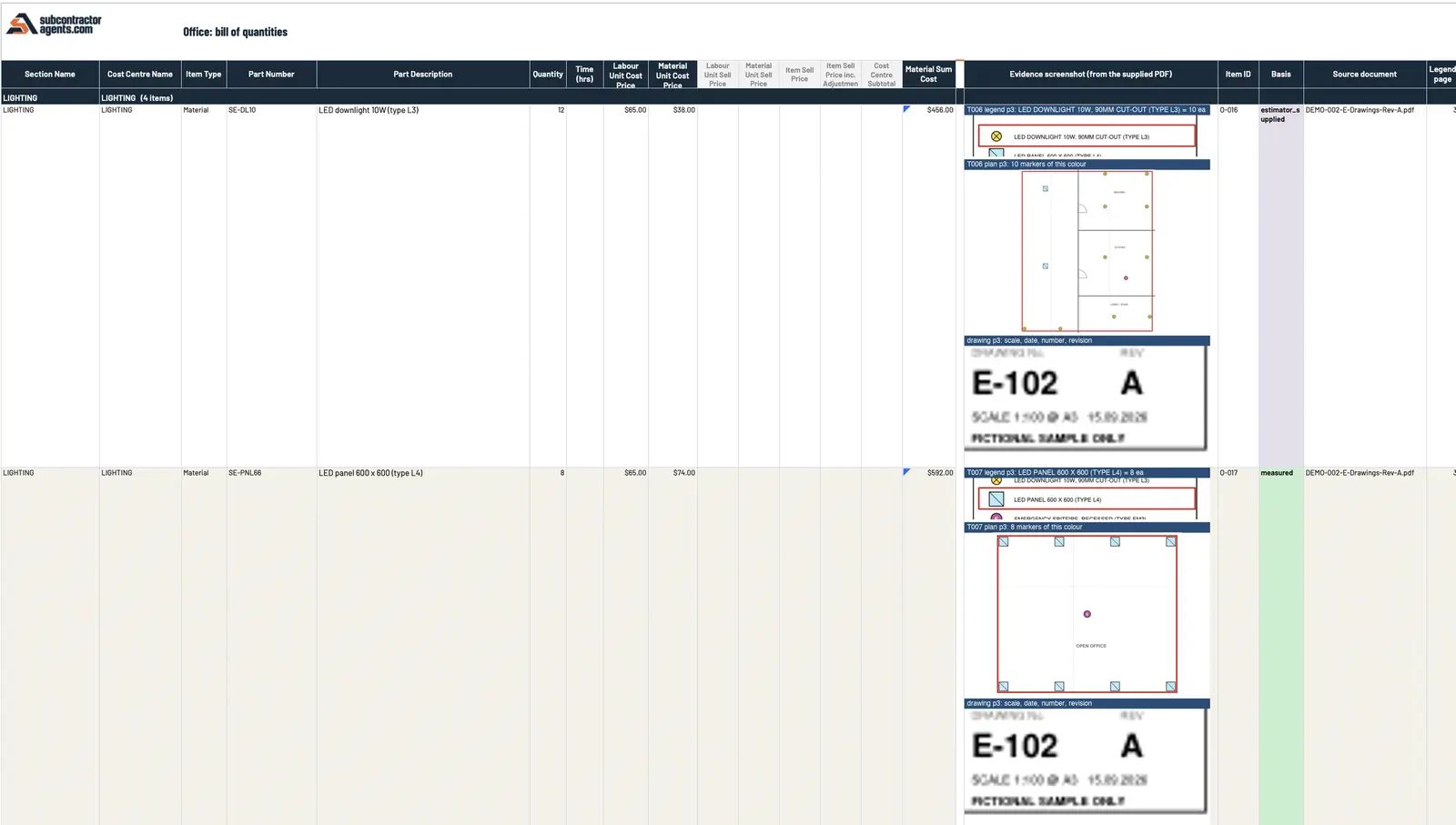 Sample data. Each lighting line carries its evidence: the legend line, the plan markers counted, and the drawing number and revision.
An electrical contractor wrote in their review: “Traced a random quantity back to the drawing sheet and revision in about ten seconds. That traceability is why I trust the rest of it.”
How should you price labour on an electrical job?
Labour is where a plausible number can still lose you money. The best workflow doesn’t leave it to memory on the night. Your labour rates and markups are set up as rules, each rate with its source and date, and they’re applied the same way on every tender. If a rate is missing, it’s listed for you to fill in, not guessed.
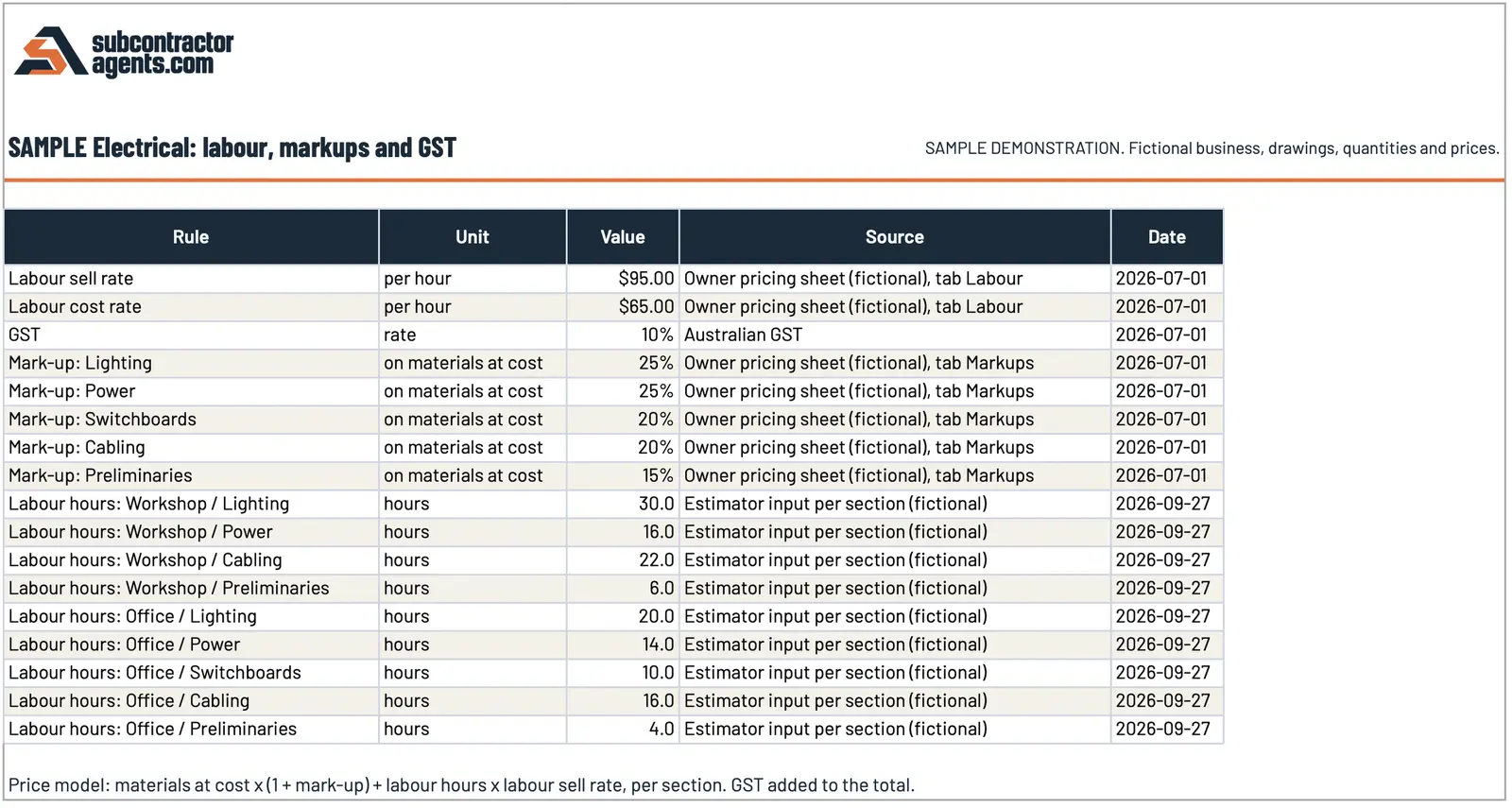 Sample data. Labour rates, markups and labour hours by section, each with its source and date.
Another electrical contractor wrote: “Labour allowances were my worry — a plausible number can still lose you money. Our confirmed allowances get applied the same way every time now.”
Your rates, rules, templates and workflow stay 100% editable, so when your rates change, you change them.
How do you know it’s right before you rely on it?
We prove it on your own completed jobs first. You give us three jobs you’ve already priced. We run the first one with you and compare it line by line, then lock the setup and run the other two without seeing your numbers. The target is every row and the price matching to the cent. Where it differs, we show you why and fix the rules, never the answer.
You keep quoting the way you do now while we build it, and switch over once you’ve seen it match. If the drawings change after that, the change schedule shows you what moved and what it does to the price, so an addendum doesn’t mean redoing your takeoff.
Where does your estimator still come in?
At every point that needs judgement:
- They sign off the BOQ before anything is priced.
- You fill in any missing rate and approve the price.
- You approve the quote. Nothing goes to the builder until you have.
It doesn’t replace your estimator. It takes the redoing and the typing off them, so their time goes on checking the numbers and making the calls.
Is it worth a look?
If you’re a commercial electrical contractor quoting from drawings, and takeoffs and labour are eating your evenings, yes. We build it from three of your quoted jobs, your pricing sheet and your quote template, and it’s in your hands within 14 days of getting your files or you get your money back. It’s A$6,000 fixed for the agreed estimating setup.
See how our estimating plugin works, and bring a recent tender to the call.
Frequently asked questions
What does the best electrical estimating workflow look like?
Sort the tender pack and register every revision first. Build the BOQ in your own layout with the drawing, page and revision beside every line, flag anything unclear instead of guessing, have your estimator sign it off, then price it from your own rates, labour and markups.
Can AI do an electrical takeoff from PDF drawings?
It can build a draft you can check, if it's set up as a process rather than one prompt. The plugin we build shows a drawing cut-out, the legend line, drawing number and revision beside each BOQ line, and tags each line measured, calculated, allowance or flagged.
How is labour priced?
From your rules, not a guess. Your labour rates and markups are set up as rules, with a source and date on every rate. Any missing rate is listed for you to fill in, and you approve the price.
Will it replace my estimator?
No. It takes the redoing and the typing off them. They check the numbers, make the calls and approve the price, and nothing goes to the builder until you've approved it.
What does it cost?
A$6,000 fixed for the agreed estimating setup, backed by our 14-day money-back guarantee. Your Claude or ChatGPT business plan is paid separately, directly to them.
Want this set up on your own jobs?
We build your estimating plugin in your own Claude or ChatGPT account, around your rates and template, and prove it on three of your completed jobs. A$6,000 fixed.
Book a workflow call →Has worked with 80+ subcontractors on estimating, tendering and job reporting.