
Estimating
How to Handle Addenda Without Redoing Your Takeoff

You’ve done the takeoff. The BOQ is checked, the rates are on, and the quote is nearly ready to go. Then the email arrives: Addendum 01, three revised drawings and a new note in the specification. The tender closes in four days.
For a lot of subcontractors, this is where the week goes. An addendum lands and you’re back at the takeoff, on a job you might not win. Not because the change is big, but because you can’t tell how big it is without counting again.
The fix is to handle an addendum as a comparison, not a fresh start.
Why does an addendum feel like starting the takeoff again?
Because most takeoffs don’t record where each number came from. If a line says 324 metres of cable and nothing else, you can’t tell whether the revised drawing changes it. The only safe way to find out is to measure it again, and once you’re measuring one line again you start doubting the rest.
The drawing set doesn’t help. Revised sheets often carry a revision cloud or two, but not always, and a change on one sheet can flow into a schedule or a note on another. Rechecking a revision can feel like starting over, even when the real change is a handful of lines.
There’s also a timing trap. If your supplier requests went out before the addendum, your suppliers may be pricing the old version of the work while you’re estimating the new one. Two sets of numbers for two different jobs, and nobody notices until the prices don’t add up.
What does an addendum actually change in your estimate?
Not every addendum touches every part of the estimate. Before you open a single drawing, sort what the addendum contains so you know where to look.
| What the addendum contains | Where it hits your estimate | What to do |
|---|---|---|
| A revised drawing (new revision) | Quantities on the lines measured from that sheet | Compare old and new revision, update only the lines from that sheet |
| A specification change | Rates, products or labour on matching lines, not quantities | Check the rate and the labour allowance behind each affected line |
| A response to tenderer questions | Scope boundaries and your exclusions | Update your scope notes, inclusions and exclusions |
| A new or deleted drawing | Whole items added or removed | Register it, then measure or remove the items it covers |
| A changed closing date or tender form | The submission, not the price | Note it in your tender register and on the quote |
The first column is the one most people skip. Ten minutes sorting the addendum saves hours of recounting sheets that didn’t change.
How do you update a takeoff without starting again?
Work through it in the same order every time:
- Register the addendum first. Record each new drawing and revision before you change any number, so you always know which revision every line is priced on.
- Keep the original. Save the checked BOQ as it was. You need it to compare against, and you may need to explain the difference later.
- Find the lines that came from the changed sheets. If every line shows its drawing number and revision, this is a filter, not a search.
- Compare old against new, line by line. For each affected line, look at the old excerpt beside the new one and update the quantity. Lines that didn’t change stay as they are.
- Reprice only what changed. Run your rates over the changed lines, including any labour that moves with the quantity.
- Record the difference. Write down every changed line, why it changed and what it does to the price. That’s your change schedule.
- Check your supplier requests. If an RFQ went out on the old revision, tell the supplier which drawings changed so their price matches yours.
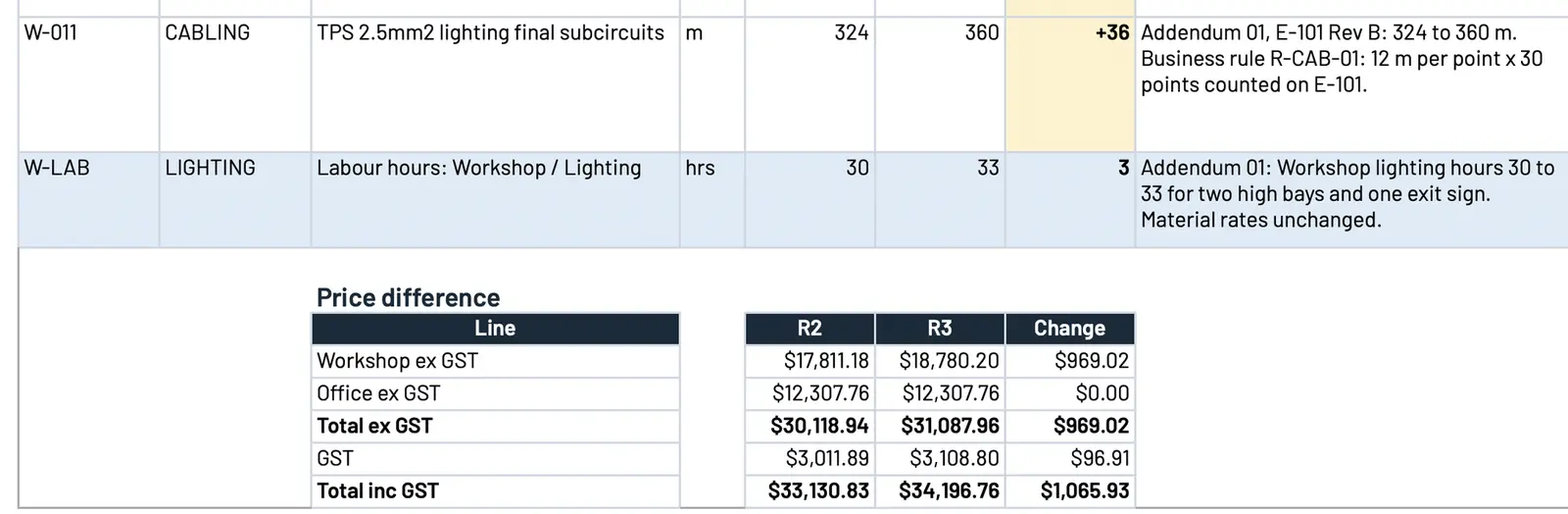 Sample data. Each changed line shows the old and new quantity and the reason, and the price difference sits underneath.
How do you show the builder what changed in your price?
With the change schedule, not a whole new quote. A builder comparing tenders wants to know two things: that you’ve priced the current documents, and what moved. A list of changed lines with the old quantity, the new quantity, the reason and the price difference answers both.
It also protects you. If the scope is questioned after award, you can show exactly which addenda you allowed for and what each one did to your number. List the addenda you’ve priced on the quote itself, too, so there’s no doubt which version of the documents your price covers.
If you’re tightening up the rest of the quoting process as well, our checklist for quoting faster without cutting corners covers what to check before anything is counted.
Why does a traceable takeoff make addenda easy?
Because the work you did on the first takeoff is what makes the second one fast. When every line shows its drawing number, revision and a cut-out of where it came from, an addendum becomes a question with a short answer: which lines came from the sheets that changed?
Without that trail, the only answer is to recount. That’s why we put so much weight on the first check. We explain what every BOQ line should show in how to check every line of an AI takeoff before you price it, and the same evidence that makes a takeoff checkable makes it easy to update.
How do we handle addenda in the estimating plugin?
We set up a custom estimating plugin in your own Claude or ChatGPT business account that runs the 15 steps a good estimator works through, in four stages, built around your trade, your BOQ layout, your pricing and your quote template:
- Measure. It registers every document and revision, pulls out every “contractor to” note and builds the BOQ in your layout. Each line shows where it came from: a drawing cut-out, the legend line, drawing number and revision. Unclear items are flagged, never guessed.
- Approve. Your estimator checks instead of redoing: number, picture, number, picture. Changes save as a new revision, marked as theirs, and sign-off locks to that exact BOQ.
- Price. Your rates, each with its source and date. Any missing rate is listed for you to fill in. You get an internal pricing workbook and a draft quote on your letterhead, with your costs and markups kept off it.
- Addenda. Addendum in, change schedule out, with before-and-after excerpts and the price difference. Your original stays untouched.
You confirm the BOQ, you approve the price and you approve the quote. Nothing goes to the builder until you have. It works with your files where they already live, on your computer or synced from SharePoint, OneDrive, Google Drive or Dropbox.
We prove it on your own work before you rely on it. You give us three jobs you’ve already priced, we run the first one with you and compare it line by line, then lock the setup and run the other two without seeing your numbers. Where it differs, we show you why and fix the rules, never the answer.
Is it worth a look?
If you’re a commercial subcontractor quoting from drawings, in HVAC, electrical or solar, and every addendum sends you back to the plans, yes. We build it from three of your quoted jobs, your pricing sheet and your quote template. It’s A$6,000, one fixed fee, backed by our 14-day money-back guarantee.
See how our estimating plugin works, or book a call and bring a tender that had an addendum.
Frequently asked questions
What is an addendum in a construction tender?
It's a change to the tender documents issued before the tender closes. It can replace drawings with a new revision, change the specification, answer questions from tenderers or move the closing date. Your price has to reflect every addendum issued, so each one needs checking against your estimate.
Do I have to redo my takeoff when an addendum comes in?
No, as long as your original takeoff shows the drawing and revision behind every line. Then you only need to find the lines the new revision touches and update those. If your quantities don't show where they came from, you can't tell what changed, which is why so many estimators end up recounting.
How do I show the builder what an addendum changed in my price?
Keep a change schedule: each changed line with its old and new quantity, the reason, and the price difference. List the addenda you've allowed for on the quote. The builder can see you've priced the current documents, and you have a record if the scope is questioned later.
What does the estimating plugin do with an addendum?
Addendum in, change schedule out, with before-and-after excerpts and the price difference. Your original BOQ stays untouched, and nothing goes to the builder until you've approved it.
What if the addendum makes part of the scope unclear?
It should stay open, not be guessed. In the plugin we build, unclear items are flagged, never guessed, so your estimator can answer them or carry them into the quote as a clarification.
Want this set up on your own jobs?
We build your estimating plugin in your own Claude or ChatGPT account, around your rates and template, and prove it on three of your completed jobs. A$6,000 fixed.
Book a workflow call →Sets up and hands over every estimating plugin with Mac, from the first tender pack to the quote letter.