
The Best Solar Quoting Process for Commercial Installers (2026)
The best solar quoting process for commercial installers: every module and run traced to the drawings, your own rates, and your sign-off.
A commercial solar tender is never one tidy design. It’s an array layout, a single line diagram, roof plans, an inverter schedule, a spec, the builder’s scope letter and often an addendum. First you work out which revision is current, and whether the switchboard is yours or “by others”.
What does the best solar quoting process look like?
Most solar quoting tools centre on the proposal: design, yield, payback. That sells the job. But pricing a builder’s tender is different. The price has to come from the drawings, and you have to stand behind every line.
The best process keeps the steps you know and fixes the retyping and guesswork:
- The pack is sorted first. Every drawing and revision registered before counting.
- Every line has a trail. Drawing number and revision beside each quantity.
- Gaps are flagged, not guessed. An unclear roof detail becomes an open question.
- Your estimator signs off before pricing. Quantities locked before any rate goes on.
- Rates and labour come from your rules. Each with a source and date.
- Addenda don’t mean starting again. You see what changed and the price impact.
Where does the time go on a commercial solar quote?
| Step | How it usually goes | The best process |
|---|---|---|
| Sort the pack | Open every PDF and work out which layout is current | Every document and revision registered before counting |
| Scope | Hope you catch every “contractor to” and “by others” note | Every “contractor to” note in one list |
| Modules, rails and runs | Count the array and measure every run by hand | BOQ in your layout, drawing number and revision per line |
| Unclear items | Guess to keep moving | Flagged as an open question, never guessed |
| Supplier prices | Chase panel and inverter prices again every tender | Your rates, each with source and date; missing rates listed |
| Labour and markups | Worked out from memory on the night | Your labour rates and markups, set up as rules |
| The quote | Typed at the kitchen table after a day on site | A draft on your letterhead, costs and markups kept off it |
What should you check on a commercial solar quote?
Whatever you quote with, these catch installers out:
- System size, stated both ways. Keep array size (kWp DC) and inverter size (kW AC) separate, so nobody compares different numbers.
- Scope edges. Roof repairs, structural checks, switchboard upgrades and network paperwork. If the tender doesn’t say, ask before you price.
- Access. EWPs, cranes and edge protection are easy to miss and costly to absorb.
- Rates with a date. A panel price from three tenders ago is a guess.
- The revision. Price the current layout, and record which one you priced.
If supplier prices hold your quotes up, see how to send supplier RFQs the same day the tender lands.
Can AI quote a commercial solar job?
Not from one prompt. Drop the drawings into ChatGPT or Claude and you get a spreadsheet in seconds. Then: where did that module count come from? Was that run measured or made up? Those rates aren’t yours. So you redo it, and you’ve added a step.
Estimating is a process, not a task. So we set up the whole process: a custom estimating plugin in your own Claude or ChatGPT account. It runs the 15 stages a good estimator works through, set up around your rates, BOQ template and quote. Four stages:
- Measure. It registers every document and revision, lists every “contractor to” note and lays out the BOQ your way. Each line shows its drawing evidence and a tag. Unclear items are flagged, never guessed.
- Approve. Your estimator checks number against picture and signs off. Sign-off locks that BOQ.
- Price. Your rates, each with a source and date. Missing rates are listed for you. A draft quote on your letterhead, costs kept off it.
- Addenda. Addendum in, change schedule out, with the price difference. Your original stays untouched.
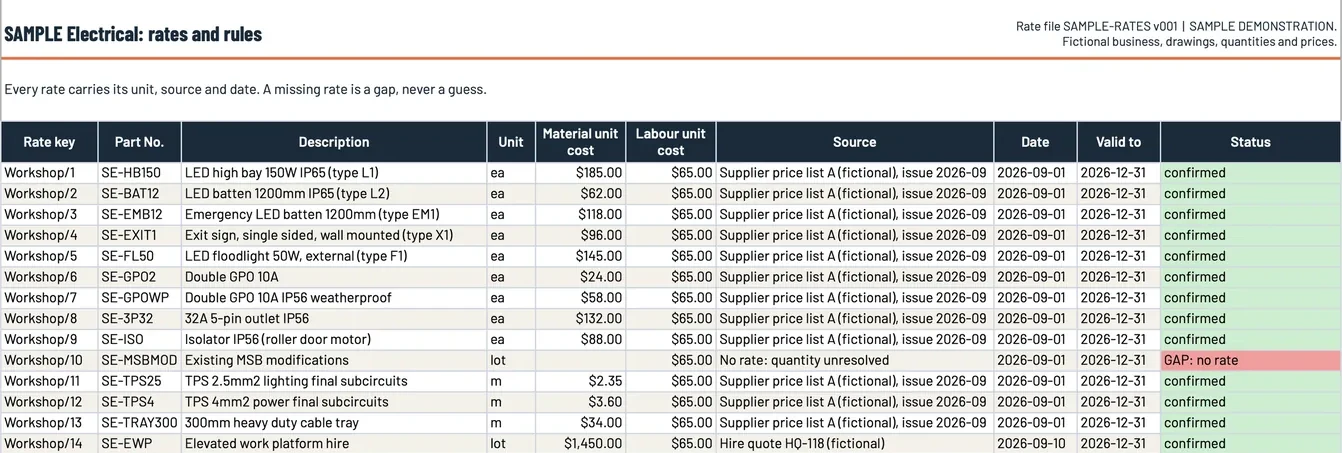 Sample data. Every rate carries its unit, source and date, and a missing rate shows as a gap, never a guess. This sample is from our fictional electrical demonstration job; a solar rate register works the same way.
What if you don’t have a proper pricing sheet?
Plenty of solar businesses price from supplier emails, an old spreadsheet and memory. That’s fine. We set it up from what you have: three quoted jobs, your pricing sheet and your quote template. Messy is fine. No pricing sheet? We make one with you, and you confirm every figure.
How do you know it’s right before you rely on it?
We prove it on three of your priced jobs first: one run with you, two blind. The target is every row and the price matching to the cent. Where it differs, we fix the rules, never the answer.
You keep quoting as you do now, and switch once you’ve seen it match. When a revised layout lands, the change schedule shows what moved and the price impact. Same approach as the best electrical estimating workflow: a number you can trace to the drawings.
Where does your estimator still come in?
At every judgement call: BOQ sign-off, missing rates, the price and the quote. Nothing goes to the builder until you approve it. It takes the redoing and typing off your estimator, not the decisions.
Is it worth a look?
If you price commercial solar tenders from drawings and the takeoff and pricing eat your evenings, yes. We set it up from three of your quoted jobs, your pricing sheet and your quote template. A fixed setup fee, confirmed on your call.
See how our estimating plugin works, and bring a recent tender to the call.
Frequently asked questions
What does the best commercial solar quoting process look like?
Register every drawing and revision first. Lay out the BOQ with drawing, page and revision on every line. Flag unclear items. Estimator signs off, then price from your rates.
Can AI quote a commercial solar job from the drawings?
It can draft one you can check, if it runs as a process, not one prompt. Every line shows its source and a tag. Your estimator signs off before pricing.
Where do the prices come from?
Your rates, each with a source and date. Missing rates are listed for you, not guessed. Costs and markups stay off the draft quote.
Does it work for solar?
Yes. Solar runs on the same core steps as every trade. Your measuring rules come from your past jobs on setup day.
What does it cost?
A fixed setup fee, confirmed on your call. Your Claude plan is paid separately, directly to them.
Want this on your own jobs?
The estimating plugin is live today: we set it up in your own Claude or ChatGPT account around your rates and your template, and your estimator checks every line before it goes out. The App, with the rest of the office, is in build.