
Sales and estimatingComing February 2027
Know which tenders need a call today.
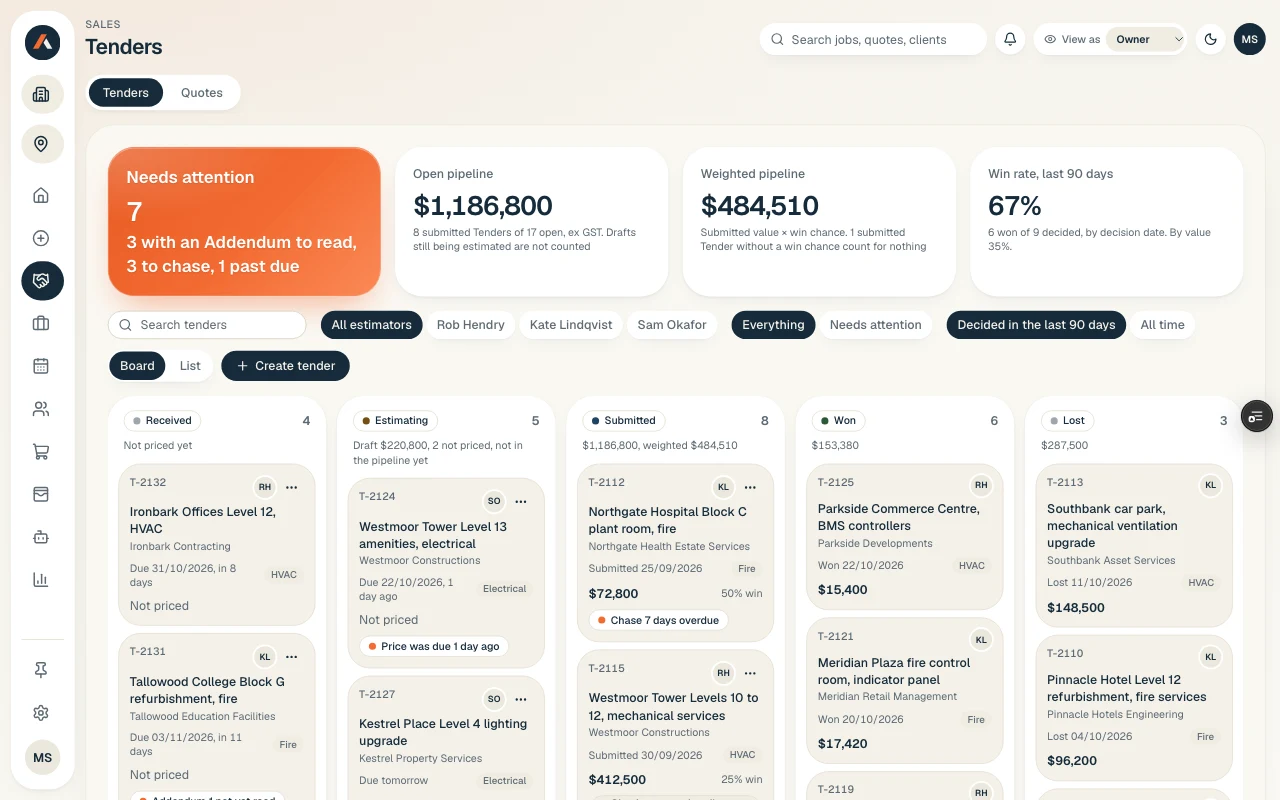
Every tender you’ve sent on one board: builder, close date, last contact. A chase reminder tells you who to ring.
Part of the App. Need tenders priced before then? The estimating plugin is available now.
Sound familiar?
Twenty tenders out and no idea which are still alive.
You find out a tender is dead when the builder rings someone else. The sent folder is the register, and the close dates live in someone’s head.
How it works
It prepares. You decide.
- 01
Add the tender
Paste the builder’s email into your Claude. It lands on the board with builder, value and close date.
- 02
Chase on time
Each tender carries a next follow-up date. When it comes up, you get a reminder, so nothing goes quiet.
- 03
You choose who to chase
Ask your Claude to draft the follow-up. You read it, change it and send it yourself.
Nothing goes out without you
What stays with your team.
Which builders get chased, and when
Every follow-up before it’s sent
Marking a tender won or lost
Reads from
FAQ
Questions subcontractors ask.
Is it ready?
Not yet. We’re building the App now, and the screens here are sample data. Join the waitlist and we’ll tell you when it opens.
Does it read our inbox or the tender portal?
No. Paste the tender email or portal notice into your Claude and it adds the tender. Nothing reads your mailbox.
What happens to a tender we lose?
You mark it lost with a reason. It stays on the board, so you see which builders and job types you win.
Related
Next to this job.
- Coming in the App
Quotes and follow-ups
Price the tender in your Claude and it lands here as a draft quote, with the takeoff reference on every line.
Read more - Coming in the App
Clients, sites and assets
Clients, sites and the equipment you look after, linked to every job, quote and certificate. Bring them across from simPRO, AroFlo or CSV.
Read more - Live today
Estimating Plugin
Give it the builder’s tender pack and it prepares the quantities, prices them with your rates and drafts the quote in the layout you already send. Your estimator checks it and you send it under your name.
Read more
The App
Put your name down for the App.
Five taps and your email. One of us reads it and replies.
Join the waitlist
Tell us what eats your week.
Join the App waitlistLaunching February 2027. No obligation, one of us replies.