
Excel vs a Dashboard for Tracking Tenders and Quotes
Excel is a good place to keep tenders and quotes. It's a poor place to see what needs doing today. Here's where each belongs, and when to add a dashboard.
Most subcontractors track tenders and quotes in Excel, and they aren’t wrong to. It’s quick, everyone can open it, and one row per tender is the right shape.
The trouble is what gets added on top. A late-follow-up colour someone must remember to apply. A summary tab that was right the day it was made. A “who’s replied” column half in the sheet, half in the estimator’s inbox. Finding what needs doing this week means scrolling, filtering and asking around, usually after hours.
So the question isn’t Excel or a dashboard. It’s which job each one does.
Is Excel or a dashboard better for tracking tenders and quotes?
Both, for different jobs. Excel holds records. A dashboard tells you what they mean today. Problems start when one does the other’s job.
| The job | In Excel | In a dashboard | Where it belongs |
|---|---|---|---|
| Entering a new tender or quote | One row, quick to add and edit | Not made for data entry | Excel (the register) |
| Seeing what’s still open and its value | A filter and a total, if nobody has added rows below the formula | Worked out every time it opens | Dashboard |
| Knowing which quotes need a follow-up today | Only if someone sorts by date and looks | Sent quotes past their follow-up date, flagged | Dashboard |
| Tracking supplier prices still outstanding | Often a second sheet, or the inbox | Requests with no reply, past due flagged | Register for the requests, dashboard for what’s missing |
| Knowing whether the numbers are current | You can’t tell from the sheet | Each source shows when it last refreshed | Dashboard |
| Several people updating at once | Version clashes and “which copy is latest?” | Read-only, so nothing to clash | One shared register, one dashboard |
| Changing a column or a rule | Easy | Needs the dashboard updated to match | Excel first, then the dashboard |
The pattern: anything you type goes in the register. Anything you look up to decide what to do goes on the dashboard.
When is a spreadsheet enough on its own?
When one person holds the whole picture. One estimator, a handful of live tenders, the sheet opened every morning. A dashboard adds little.
It stops being enough when:
- Follow-ups get missed. The date is there; nobody sorted by it this week.
- More than one person edits it. Someone saves over someone else, or works from an emailed copy.
- Someone rebuilds a summary every Friday. Same numbers typed twice, usually by the owner.
- Only one person understands it. On leave, nobody can answer “what have we got out?”
- Tender details are spread around. One contractor needed drawings, job codes, suppliers asked and prices returned linked per tender. None of it lived in one place.
Two or three of those? Keep the spreadsheet as the register. Stop using it to find what needs doing.
What does a dashboard show that a spreadsheet doesn’t?
Two things: what needs action now, and whether you can trust the numbers.
A spreadsheet shows every row equally. A dashboard sorts the work: late and missing items first, each with a next step and an owner.
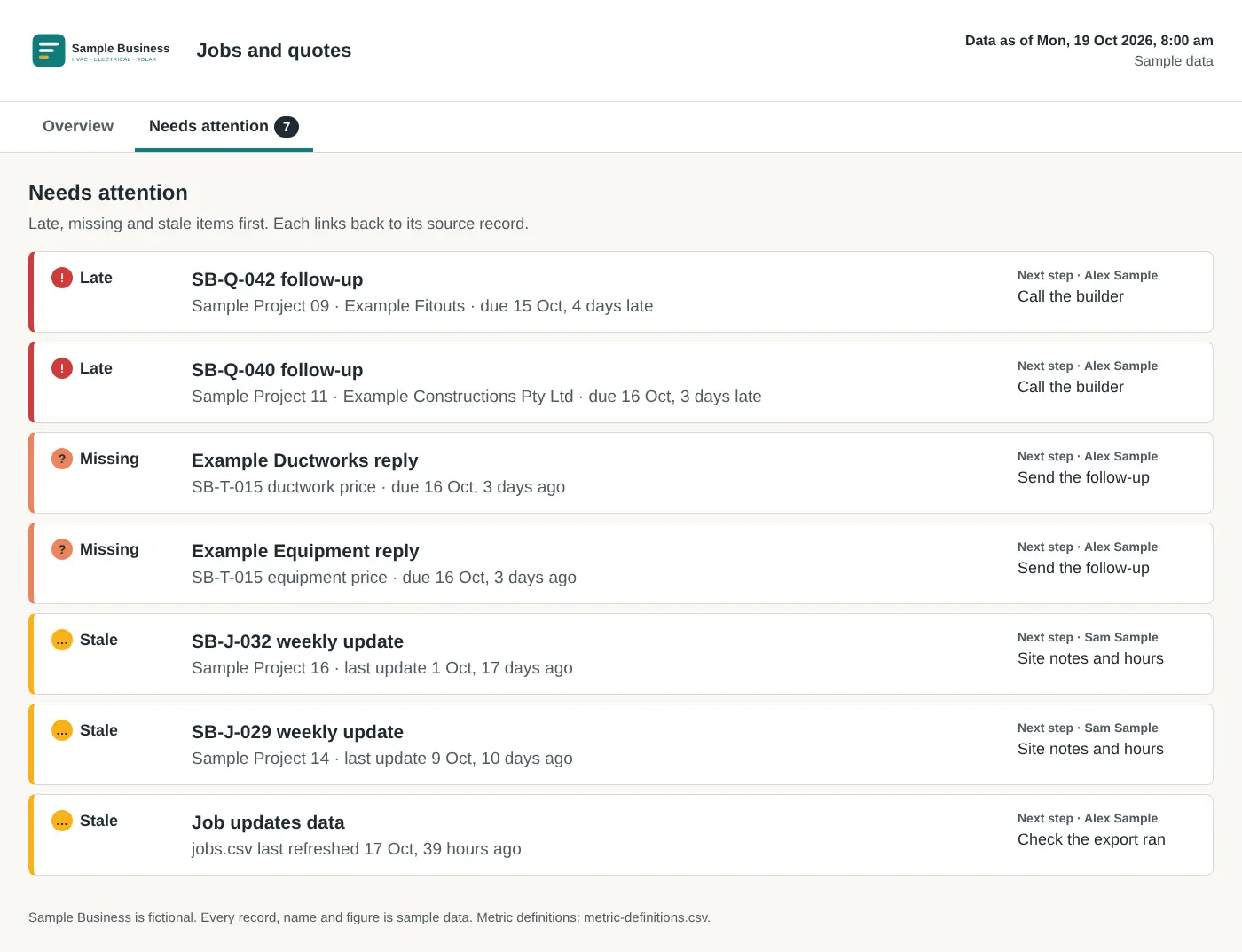 Sample data. A fictional subcontractor’s “needs attention” list: late follow-ups, missing supplier prices and stale data first, each with its next step and owner.
Then freshness. A spreadsheet can’t tell you it’s out of date. A good dashboard marks any source not refreshed in 24 hours as stale. Seven numbers you trust beat thirty you don’t.
How do you move from a spreadsheet to a dashboard without starting again?
Keep the spreadsheet. Tidy it so a dashboard can read it.
- One row per tender or quote. No merged cells, mid-sheet subtotals or notes in the value column.
- A fixed set of stages. Drafting, Awaiting review, Sent, Won, Lost. A stage typed five ways can’t be counted.
- The dates that drive action. Tender closes, follow up on, and for supplier requests, reply due and received.
- Values ex GST, as numbers. Not “approx 45k” or “TBC”.
- One copy. On SharePoint, OneDrive or Google Drive, not in someone’s email.
That’s most of the work. Every dashboard number then traces back to a row. The numbers that matter for quotes are in the quote tracking dashboard; the wider version, Xero and Procore included, is in how to stop double handling with one dashboard.
Where do the quotes in the register come from?
A dashboard tracks quotes. It doesn’t make quoting faster. If each tender takes days of retyping quantities, the register stays short.
That’s what our estimating plugin is for. It fills your BOQ in your layout with drawing, page and revision on every line, prices it from your rates and drafts the quote on your letterhead. It works on your files where they live; workbooks open in Excel or Sheets. Your estimator approves the BOQ before pricing, and nothing goes to the builder until you approve.
How do we set up a tender and quote dashboard for you?
We set up dashboards around your weekly checks: quotes awaiting review, missing supplier replies, jobs needing an update. It’s separate from the estimating plugin, agreed in a proposal after your estimating setup is delivered.
If your tender spreadsheet only makes sense to one person, book a call. Bring the spreadsheet, whatever shape it’s in.
Frequently asked questions
Should I stop using Excel to track tenders and quotes?
No. A spreadsheet is a good register, one row per tender or quote. A dashboard reads it and tells you what needs doing today. The sheet stays.
What's the difference between a spreadsheet and a dashboard?
The spreadsheet holds and edits records. The dashboard is read-only and works out what's open, late, missing and stale. People type into one and look at the other.
When is a spreadsheet enough on its own?
When one person runs a few live tenders and checks the sheet daily. Not when several people edit it, follow-ups slip or someone rebuilds a summary every Friday.
What should a tender and quote dashboard show?
Quotes awaiting review, open quote value, late follow-ups, outstanding supplier prices, the next closing date and when each source last refreshed. Each item links to its row.
Is the dashboard part of the estimating plugin?
No. The plugin prepares the BOQ, pricing workbook and draft quote. Dashboards are separate work we can agree after your estimating setup is delivered.
Want to see what needs your attention first?
The App reads from your job system, inbox and Xero and shows what needs a decision each week. It is in build, and the waitlist is open. Estimating is live today as the plugin.