
Claude vs ChatGPT for Construction Estimating (2026)
Claude or ChatGPT for estimating from drawings? Why the setup around the AI matters more than the brand, and how to test it on your own jobs.
It’s one of the first questions on a call: Claude or ChatGPT for estimating? Usually it follows a bad experience. You dropped in the drawings and got a spreadsheet in thirty seconds. It looked right. Then you checked a few lines and couldn’t tell where any number came from.
So you try the other one. Fair instinct, wrong problem.
Is Claude or ChatGPT better for construction estimating?
The brand isn’t what lets you down. On a single prompt, neither shows what it measured. Neither knows your scope, allowances or rates, so both fill gaps with plausible guesses and don’t say which numbers are guesses.
Swap one for the other and the problem stays: a number with no proof, and an estimator redoing the takeoff to check it.
So our plugin runs in Claude or ChatGPT, in your existing account. The structure does the work, not the logo.
What actually decides whether an AI estimate is right?
A good estimator works through steps with rules. We set the AI up the same way: 15 steps in four stages. Drawings to quantities, you confirm the BOQ, pricing, then quotes and changes. You come in three times: confirm the BOQ, approve the price, approve each letter.
Where each thing that matters comes from:
| What decides your estimate | Comes from | In our setup |
|---|---|---|
| Where each quantity came from | The setup | Drawing, page and revision on every BOQ line |
| What’s in your scope | The setup | Your scope rules, with anything unclear asked, not guessed |
| Your rates | The setup | Your rate register, each rate with its source and date |
| Gaps | The setup | Flagged for your estimator, never filled in |
| The price | Your estimator | BOQ signed off before pricing, price approved before anything goes out |
| The quote | The setup | Your letterhead, with your costs and markups kept off it |
| Addenda | The setup | A change schedule with the price difference |
| Where your files sit | Your account | Your own business Claude or ChatGPT account |
Only the last row depends on which AI you pick.
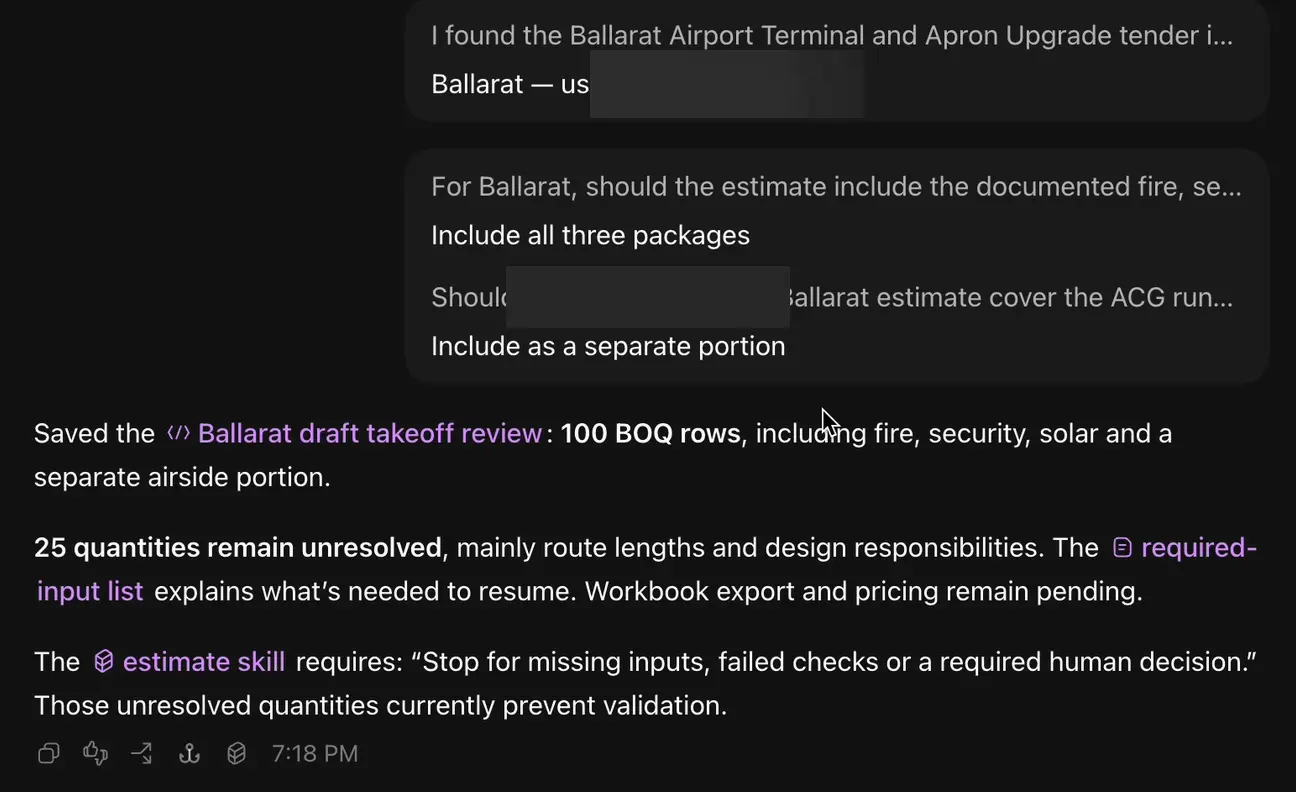 Sample demonstration in ChatGPT. It asks the scope questions, then stops on what it can’t settle instead of guessing.
A quick prompt never gives you this. It asked which packages were in scope, drafted the BOQ, listed what it couldn’t settle and paused pricing for a person. That behaviour is in the plugin’s rules, not left to chance.
How do you choose between Claude and ChatGPT for your business?
Keep it simple:
- Use the one you already pay for. We set up the plugin in your existing account. No new tool to choose.
- Use a business plan. It keeps files in your company’s account, and your data isn’t used for training by default. You pay them directly. We confirm the right plan on your call.
- Keep files where they live. Your computer, or synced from SharePoint, OneDrive, Google Drive or Dropbox. Workbooks open in Excel or Sheets.
On the data side, read is it safe to put your drawings and rates into ChatGPT or Claude.
Either way you get the same templates set up around you: BOQ layout, sections and units; rates, labour and markups as rules; your quote template on your letterhead. You own the plugin and files, in your own account.
How do you test it before you trust it?
Judge it on your jobs, not a demo. Here’s how we prove it:
- You give us three jobs you’ve already priced.
- We run the first with you and compare line by line.
- We lock the setup and run the other two without seeing your numbers.
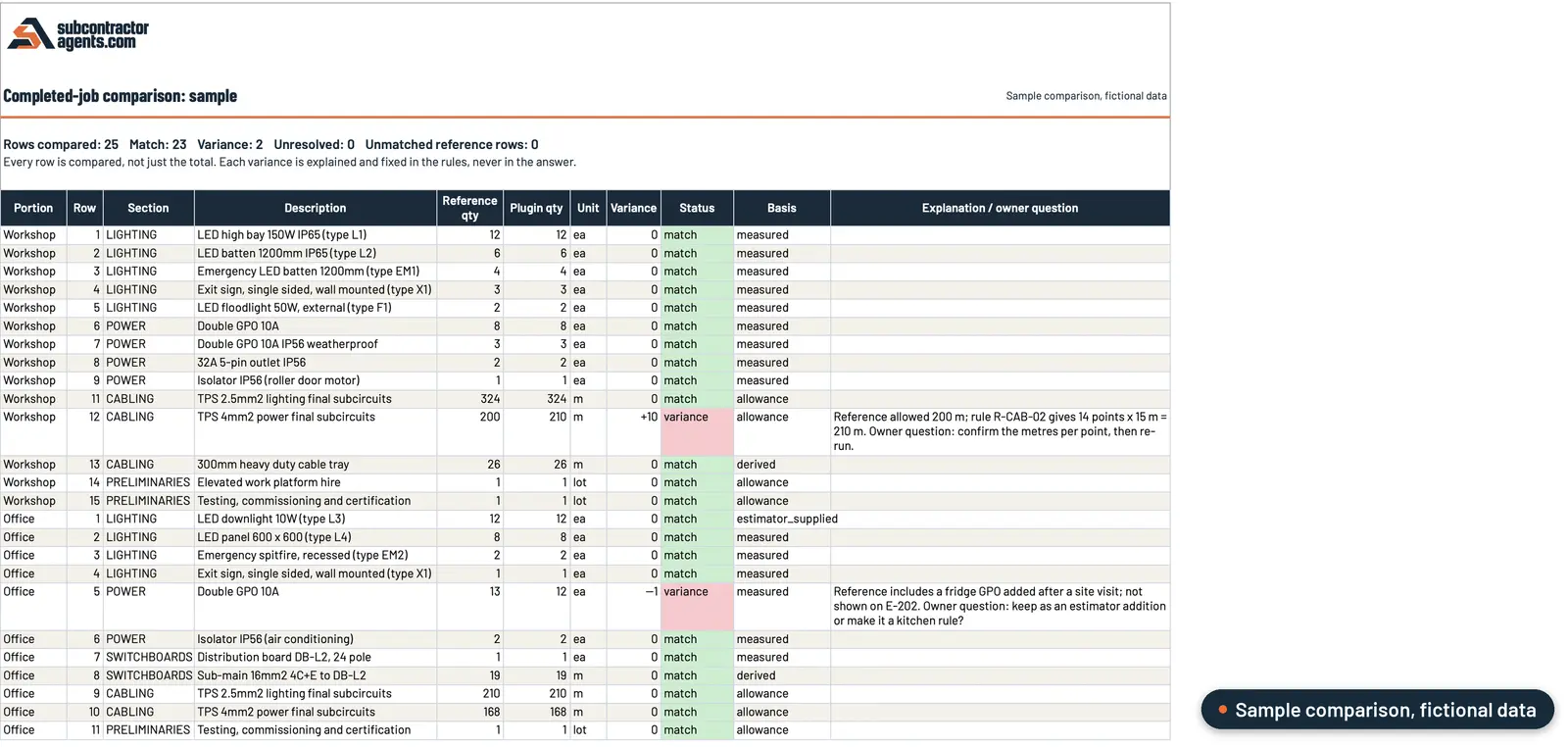 Sample data. Every row is compared, not just the total, and each difference comes with its reason.
The target is every row and the price matching to the cent. Where it differs, we show why and fix the rules, never the answer. You keep quoting as now until it matches.
So, Claude or ChatGPT?
Use the one you have, on a business plan, and put the effort into the setup. Your rates, scope rules and your estimator’s sign-off turn either into numbers you can check.
That’s what we set up, for a fixed setup fee: see how our estimating plugin works. If a quick prompt was way off, start with can ChatGPT or Claude do construction estimating. For the full cost picture, read what AI estimating costs.
Frequently asked questions
Is Claude or ChatGPT better for construction estimating?
On a single prompt, neither shows what it measured. Our plugin runs in either, so pick the one you already use and judge it on your completed jobs.
Which Claude or ChatGPT plan do I need?
A business plan on either, so files stay in your company's account. You pay them directly. We confirm the right plan on your call.
Do I need someone technical to set it up?
No. Just someone who knows how you price. They send files, answer our questions and check the first job with us line by line.
How do I know the numbers are right, whichever one I use?
Every line shows drawing, page and revision, tagged measured, calculated, allowance or flagged. Your estimator signs off the BOQ before pricing. Nothing goes out until you approve.
What does it cost?
A fixed setup fee, confirmed on your call, tested on your completed jobs. Your Claude or ChatGPT subscription is paid separately, directly to them.
Want this on your own jobs?
The estimating plugin is live today: we set it up in your own Claude or ChatGPT account around your rates and your template, and your estimator checks every line before it goes out. The App, with the rest of the office, is in build.